
Nano Banana Contact Sheet Prompts: Multi-View Scene Guide
NanoBanana Team · July 19, 2026 · 7 min read
Keywords: nano banana, contact sheet prompts, ai character consistency, multi-view scenes
Published: July 19, 2026 Author: NanoBanana Team
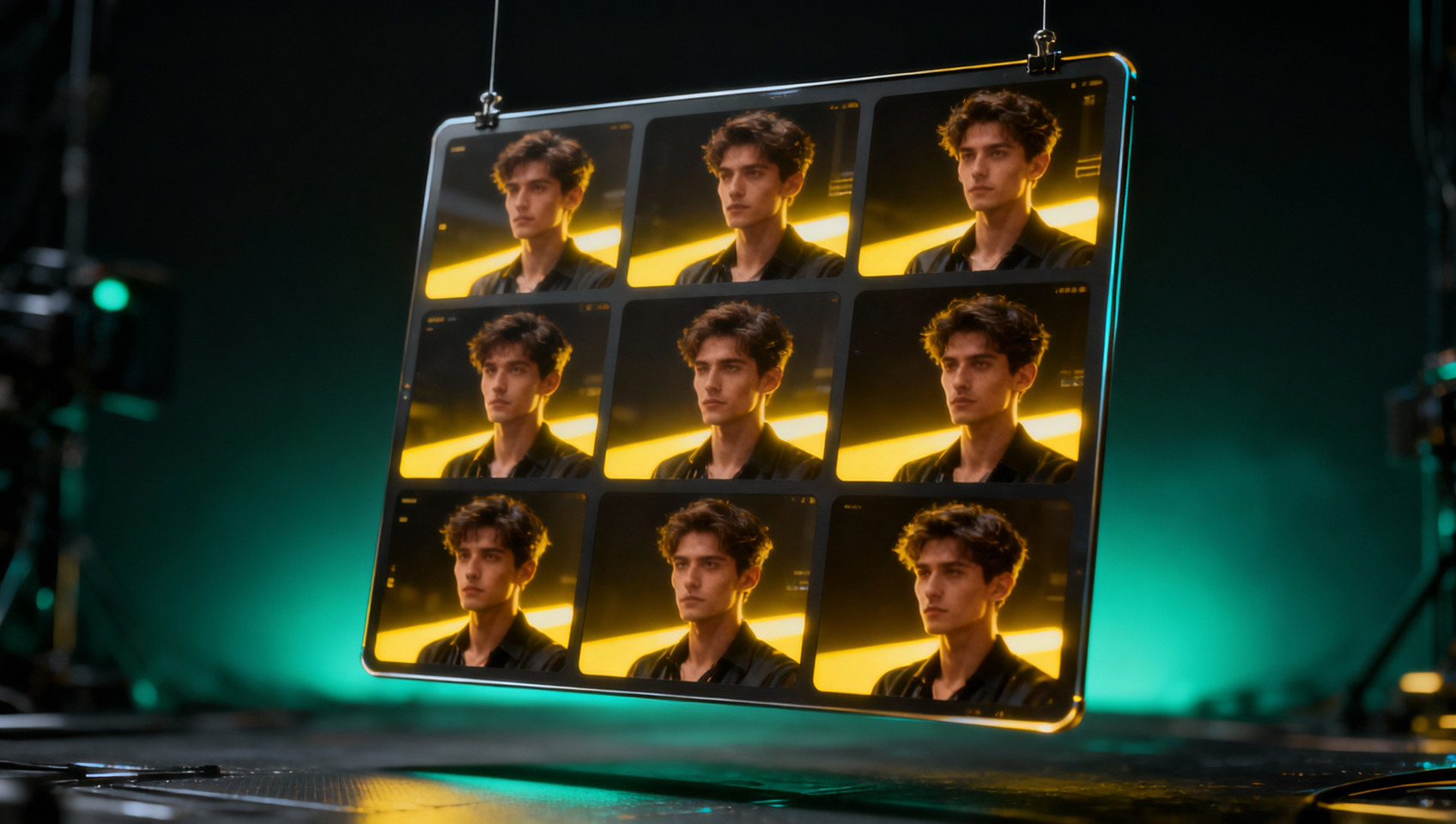
Mastering Consistency with Multi-View Contact Sheets
Generating a single stunning image is often easy with modern AI tools. The real challenge arises when you need a character to look identical across multiple angles, lighting conditions, or actions. This consistency gap is where many creative workflows stall. You generate a hero shot, but the next frame looks like a different person wearing the same clothes. For storyboard artists, concept designers, and comic creators, this inconsistency breaks immersion and requires hours of manual editing.
The contact sheet method solves this by forcing the model to generate multiple variations within a single generation pass. Instead of hoping for consistency across ten separate prompts, you request a 3×3 grid where the underlying latent noise and conditioning remain shared. This approach leverages Nano Banana's capabilities to maintain character identity and lighting logic across all nine frames.
Who This Is For
This workflow is not designed for casual users looking for a single wallpaper. It is built for practitioners who need volume and variance without losing coherence.
- Storyboard Artists: You need to show a scene from wide, medium, and close-up angles without the protagonist changing facial structure.
- Character Designers: You need to present a turn-around sheet or expression map to a client quickly.
- Marketing Teams: You need multiple variations of a product shot or brand ambassador for A/B testing social media assets.
- Comic Creators: You need consistent panels where the reader recognizes the hero from frame to frame.
If your work requires iteration on a specific subject rather than random exploration, this guide outlines the parameters and prompt structures you need.
The Anatomy of a Contact Sheet Prompt
When working with Nano Banana on MidassAI Studio, the prompt structure dictates the grid layout and the content within each cell. A common mistake is treating the contact sheet prompt like a standard single-image prompt. You must explicitly define the grid structure and the variance you expect.
A robust prompt follows a modular structure. Start with the global settings that apply to the entire sheet. This includes the art style, rendering engine simulation, and overall lighting mood. For example, specifying "cinematic lighting, 35mm film grain" sets the baseline for all nine images.
Next, define the subject. This is where consistency is won or lost. Use specific descriptors for clothing, hair color, and distinguishing features. Avoid vague terms like "cool outfit." Instead, use "worn leather jacket with brass zippers, dark denim jeans." The more concrete the visual anchors, the less the AI hallucinates changes between frames.
Finally, specify the variance. You do not want nine identical images. You need to instruct the model on what changes. Do you want different camera angles? Different facial expressions? Different background elements? Your prompt should read something like: "3x3 contact sheet, same character, varying camera angles from wide to close-up, consistent lighting."
Quick Takeaways
Lighting and Environment Locking
One of the most frequent failure points in multi-view generation is lighting drift. In frame one, the light comes from the left. In frame five, it shifts to the right, making the sequence unusable for a coherent scene. To prevent this, your prompt must treat lighting as a static variable.
Specify the light source explicitly. Use phrases like "key light from top-left," "softbox lighting," or "golden hour sun from behind." By anchoring the light source in the text prompt, you guide the model to maintain physical logic across the grid. Additionally, define the environment broadly but firmly. If the character is in a "cyberpunk alleyway," ensure that description is present in the global settings of the prompt so every cell in the 3×3 grid respects that background context.
Nano Banana processes these constraints through its underlying Google Gemini-powered vision models. It understands spatial relationships better than older generations of generators. However, it still relies on your textual precision. If you leave the background ambiguous, the model will fill each cell with a different interpretation of "alleyway," resulting in a disjointed sheet.
Executing the Workflow in MidassAI Studio
Setting up this workflow requires access to the right parameters. MidassAI Studio Nano provides the interface needed to adjust aspect ratios and generation counts effectively. When you initiate a generation, ensure the aspect ratio supports a grid layout. Typically, a square or 4:3 ratio works best for a 3×3 arrangement, though you can crop later.
Start by uploading a reference image if you have one. Nano Banana supports image-to-text and image-to-image workflows. If you have a specific character face you need to maintain, upload that as a reference. The model will use the visual embedding to anchor the identity across the nine generated variations. This is significantly more reliable than text descriptions alone.
Once your prompt is set, run a test generation. Review the output for consistency. Look specifically at the hands, eyes, and clothing details. These are high-frequency areas where AI models often introduce errors. If one cell in the grid has a malformed hand, you may need to adjust the negative prompt or increase the guidance scale to enforce stricter adherence to your description.
Common Pitfalls and How to Avoid Them
Even with a solid prompt, issues can arise. The most common problem is "grid bleed," where elements from one cell spill into another. This happens when the model fails to segment the grid boundaries correctly. To mitigate this, include keywords like "distinct panels" or "separated frames" in your prompt.
Another issue is subject drift. The character might look consistent in the first row but changes significantly by the third row. This often indicates the prompt is too complex. Simplify the variance request. Instead of asking for different angles AND different expressions AND different backgrounds, ask for only different angles. Keep the variables controlled.
Resolution is also a factor. Generating a 3×3 grid splits the total pixel count across nine images. If the total resolution is too low, each individual frame will lack detail. Ensure you are generating at a high enough resolution so that when cropped, each individual cell remains usable for your project.
Scaling Your Production
Once you have a prompt that yields a consistent contact sheet, save it as a template. Consistency is not just about one image; it is about repeatability. You should be able to swap the character description while keeping the lighting and grid structure identical for a new scene. This allows you to build a library of assets that look like they belong to the same universe.
For larger projects, consider generating multiple sheets. One sheet for close-ups, one for wide shots, and one for action poses. This organizes your assets logically and makes the editing phase much faster. You are not hunting for the right angle; you have a sheet dedicated to that specific view.
Final Thoughts
The contact sheet workflow transforms AI image generation from a lottery into a production tool. It gives you control over variance while maintaining the core identity of your subjects. By mastering the prompt structure and leveraging the capabilities within MidassAI Studio, you can produce professional-grade storyboards and character sheets in minutes rather than days.
The technology is ready to handle complex consistency tasks, but it requires a practitioner's touch to direct it. Focus on locking your lighting and subject details first, then introduce variance slowly. Test your prompts, refine your parameters, and build a library of reliable workflows.
Ready to streamline your visual production pipeline? Test these prompting strategies directly in the platform designed for high-fidelity generation.