
Three Illustration Ideas You Can Rebuild with Nano Banana
NanoBanana Team · July 19, 2026 · 6 min read
Keywords: Nano Banana, MidassAI Studio, AI image generator, Google Gemini art
Published: July 19, 2026 Author: NanoBanana Team
Unlocking Creative Potential with Nano Banana
Generative AI has shifted from a novelty to a core component of the modern creative workflow. However, moving from abstract concepts to concrete assets often requires more than just a text box; it demands a structured environment where iteration happens quickly. Nano Banana, available within MidassAI Studio, leverages Google Gemini technology to bridge the gap between prompt engineering and polished illustration. This tool is not just about generating random images; it is about rebuilding specific visual ideas with consistency and control.
In this overview, we will walk through three distinct illustration scenarios. These examples demonstrate how natural language processing can interpret complex stylistic requests, from food photography aesthetics to character design. Whether you are building a marketing campaign or prototyping a storybook, understanding how to structure your inputs for Nano Banana is critical. We will examine the prompt anatomy, the resulting visual fidelity, and how to maintain style across different subjects.
Who This Is For
This guide is designed for digital creators, marketing professionals, and indie developers who need reliable visual assets without the overhead of traditional production pipelines. If you are tired of wrestling with unstable generators that ignore negative constraints or fail to maintain character consistency, this workflow is for you. It is also suitable for educators and content strategists looking to visualize concepts rapidly for presentations or social media content. You do not need deep technical knowledge of machine learning models, but you should be comfortable iterating on text prompts to refine output.
Quick Takeaways
Case Study 1: The Veggie Dessert Poster
Food illustration often fails in AI generation because models struggle with texture differentiation. A carrot should not look like plastic, and cream should not resemble foam. For this case, the goal was a vibrant poster promoting a healthy dessert line. The challenge lies in lighting and material definition.
The Prompt Strategy: Instead of a generic request for "vegetable cake," we specified lighting and camera parameters. The prompt included terms like "macro photography," "softbox lighting," and "condensation on surface." We explicitly requested a color palette of earthy greens and warm oranges to avoid the neon oversaturation common in earlier models.
Execution in MidassAI Studio: When running this through Nano Banana, the initial generation captured the composition but lacked texture depth. By adjusting the guidance scale slightly and re-emphasizing "organic texture" in the second iteration, the model rendered the sugary glaze on the vegetables accurately. The result was a usable asset that required minimal post-production editing. This highlights the importance of describing physical properties rather than just objects.
Case Study 2: Hug Dog Joyful Run
Character motion is a notorious pain point in static image generation. Dogs often appear with extra legs or unnatural spinal curvature when depicted in motion. For this scenario, we aimed to capture a specific emotion: joy during a run. The focus was on the "Hug Dog" character, a stylized mascot intended for a pet care brand.
The Prompt Strategy: To achieve natural motion, the prompt focused on body mechanics. We used descriptors like "front paws extended," "ears flowing backward," and "dynamic blur." We also specified the breed characteristics to ensure the mascot remained recognizable. Avoiding generic terms like "cute" in favor of "expressive eyes" and "open mouth smile" helped the model understand the emotional tone.
Execution in MidassAI Studio: Nano Banana handled the anatomy significantly better than standard open-source models. The integration with Gemini allows for better semantic understanding of spatial relationships. In the first pass, the tail position was awkward. A simple follow-up instruction to "adjust tail angle for balance" corrected the physics without needing to regenerate the entire image. This iterative capability is crucial for mascot design where brand consistency is key.
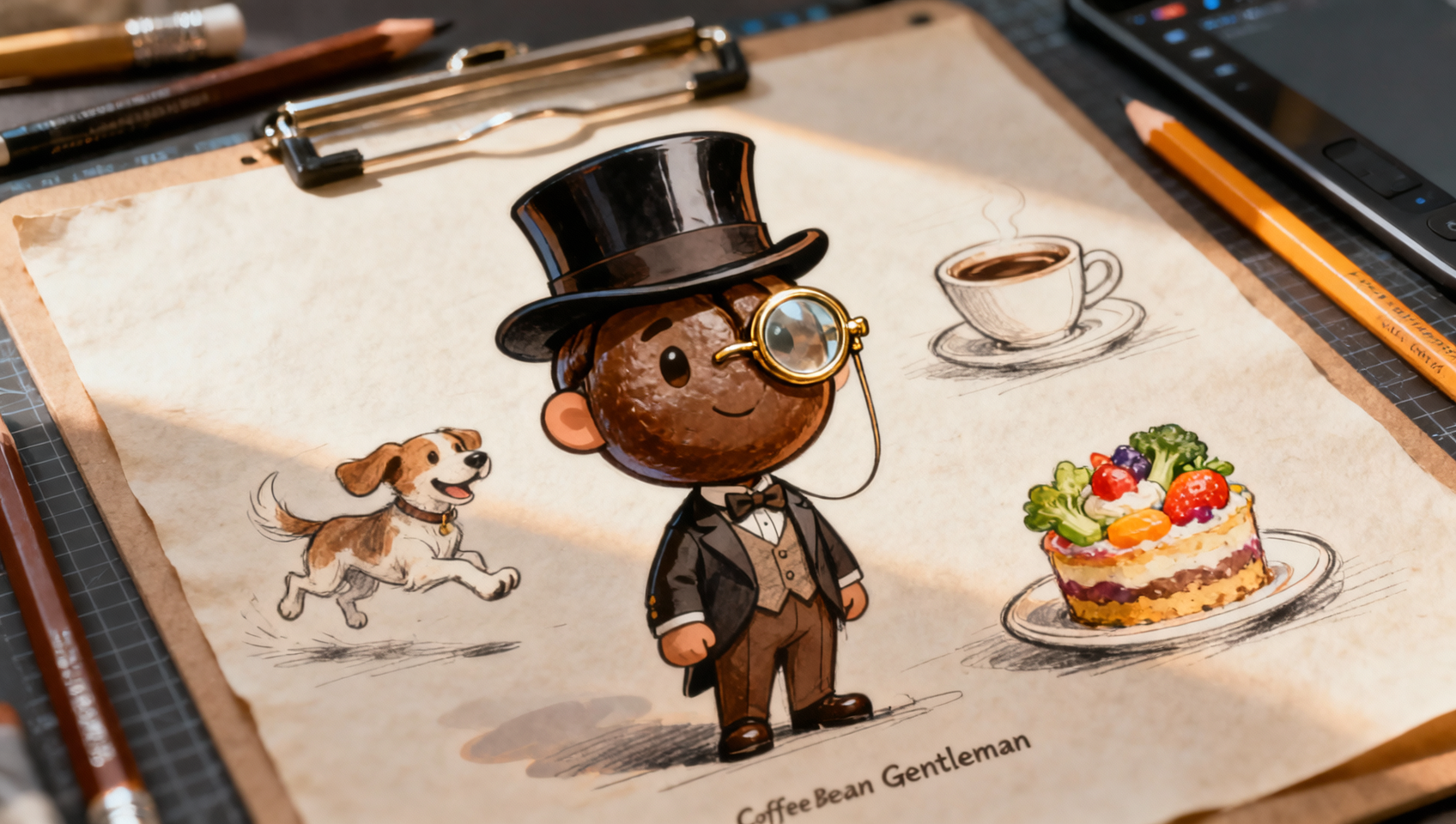
Case Study 3: Coffee Bean Gentleman Writing on a Book
This scenario tests anthropomorphism and detail retention. Creating a character that is part object (coffee bean) and part human (writing) requires the model to understand context without blending the textures incorrectly. The goal was a whimsical illustration for a café menu or blog header.
The Prompt Strategy: We defined the environment clearly: a wooden desk, warm ambient light, and an open leather-bound book. The character description specified "glossy coffee bean texture" for the skin and "human hands" for the writing action. We explicitly stated "no melting" to prevent the model from warping the bean shape due to the heat implication of coffee.
Execution in MidassAI Studio: The output maintained the integrity of the coffee bean shape while allowing for human-like posture. The lighting reflected off the bean surface realistically, indicating a high level of material rendering. This case proves that Nano Banana can handle complex surrealism without devolving into abstract noise. It is particularly useful for branding projects that require unique, ownable characters rather than stock photography.
Maintaining Style Consistency Across Generations
Generating one great image is easy; generating ten that look like they belong to the same project is hard. When working within the Nano Banana environment, consistency comes from prompt templating. Do not rewrite your entire prompt for every new image. Instead, keep a core block of style descriptors constant.
For example, if your style definition includes "flat vector art, pastel palette, thick outlines," ensure this string appears in every request. Only change the subject matter. MidassAI Studio allows you to save these workflows, meaning you can recall the exact parameters used for the "Veggie Dessert" when you move on to a "Fruit Beverage" poster. This reduces variance in lighting and rendering engines between batches. Additionally, utilize the seed locking features if available in your specific studio configuration to keep noise patterns consistent.
Final Thoughts on Workflow Integration
The true value of Nano Banana lies in its integration within MidassAI Studio. It is not just a model wrapper; it is a workspace designed for production. By testing these three illustration ideas, you can see how specific prompting leads to reliable outcomes. The ability to iterate on natural language feedback distinguishes this tool from basic generators that require exact parameter tweaking.
If you are ready to move beyond trial and error and start building a library of consistent assets, you need a platform that supports iterative design. Explore the capabilities discussed here and apply them to your next project.
Try Nano Banana in MidassAI Studio to start rebuilding your illustration workflow today.